By using this site, you agree to the Privacy Policy and Terms of Use.
Accept

Gadget Issues

Fix Your Gadgets

  • About Us
  • How to Fix
  • Error Fix
  • Tutorial
  • Tech News
© 2025 All Rights Reserved.
Reading: How to Repair a Severed Cable: A Step-by-Step Guide
Share
Sign In
Notification Show More
Font ResizerAa

Gadget Issues

Fix Your Gadgets

Font ResizerAa
  • About Us
  • How to Fix
  • Error Fix
  • Tutorial
  • Tech News
Search
  • About Us
  • How to Fix
  • Error Fix
  • Tutorial
  • Tech News
Have an existing account? Sign In
Follow US
© 2022 Foxiz News Network. Ruby Design Company. All Rights Reserved.
Gadget Issues > Blog > How to Fix > How to Repair a Severed Cable: A Step-by-Step Guide
How to Fix

How to Repair a Severed Cable: A Step-by-Step Guide

skynet
Last updated: March 5, 2025 8:48 am
skynet
Share
3 Min Read
SHARE

Accidentally cutting a cable in half can be frustrating, but don’t worry—it can often be fixed with some simple tools and patience. Follow these steps to restore your cable’s functionality.

Contents
Materials Needed:Step-by-Step Repair Process:1. Prepare the Cable2. Identify and Match Wires3. Join the Wires4. Insulate the RepairTesting the CableWhen to Replace Instead of Repair

Materials Needed:

  • Wire strippers
  • Electrical tape or heat shrink tubing
  • Soldering iron and solder (optional but recommended for stronger connections)
  • Heat gun (if using heat shrink tubing)
  • Connector blocks (alternative to soldering)

Step-by-Step Repair Process:

1. Prepare the Cable

  • Start by carefully stripping about 1 inch (2.5 cm) of insulation from both ends of the severed cable.
  • Separate the inner wires and strip about ½ inch (1.25 cm) of insulation from each wire.

2. Identify and Match Wires

  • Match the corresponding wires by color.
  • If the cable has shielding, ensure the shielding is also reconnected.

3. Join the Wires

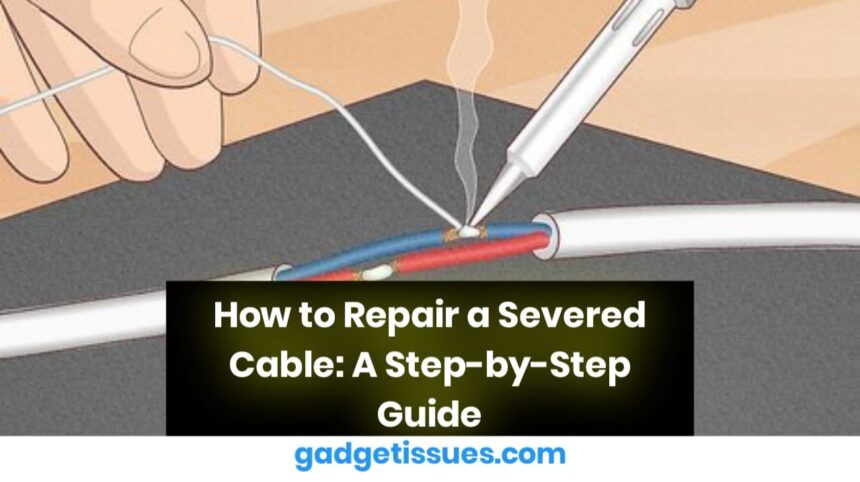
  • Option 1: Soldering (Best for Durability)
    • Twist corresponding wires together.
    • Apply solder to the twisted wires for a strong electrical connection.
    • Cover each soldered joint with heat shrink tubing and apply heat to secure.
  • Option 2: Using Connector Blocks (No Soldering Required)
    • Insert corresponding wires into connector blocks and tighten the screws.
    • Wrap the repaired section with electrical tape for added protection.

4. Insulate the Repair
  • Use heat shrink tubing or electrical tape to cover and insulate each wire.
  • If using heat shrink tubing, apply heat evenly to shrink it in place.
  • Wrap the entire repaired section with an additional layer of electrical tape for extra strength.

Testing the Cable

Before using the repaired cable, test it to ensure a proper connection:

  • Plug it in and check if the device functions correctly.
  • For power cables, verify that there are no sparks or unusual behavior.
  • For data cables (like USB or Ethernet), test connectivity with a device.

When to Replace Instead of Repair

  • If the cable carries high voltage or handles critical data (e.g., medical or industrial cables), replacement is safer.
  • If the inner wires are extensively damaged or frayed, a new cable is the best option.

Also read : How to Repair a Broken Laptop Hinge? A Step-by-Step Guide

You Might Also Like

How to Spot Hidden Damage After Dropping Your Phone

10 Common Samsung Phone Repair Problems and Solutions

Top Reasons Smartphones Overheat & How to Prevent It

How to Effectively Remove Water From Your Samsung Phone: A Step-by-Step Guide

How to Fix MacBook Display “Staingate” Issue: A Step-by-Step Guide

TAGGED:Cable JointingCable RepairDamaged CableDIY FixElectrical FixElectrical SafetyElectronics RepairFix Broken WireHandyman TipsHome RepairSevered CableTech FixWire ConnectionWire RepairWire Splicing
Share This Article
Facebook Twitter Copy Link Print
Share
Previous Article How to Fix Dell Laptop Battery Draining Issues
Next Article How to Fix a Faulty Headphone Microphone: A Step-by-Step Guide

Latest News

Green Lines on Phone Screen
What Causes Sudden Green Lines or Black Spots on Your Phone Screen?
Uncategorized
The Master Blueprint for 2026: Top 8 Essential Laptop and Computer Repair Tips
How to Fix
Fix a water-damaged phone in 2026 using the silica gel method. Learn why the rice myth fails and follow our 3-phase emergency guide to rescue your device and data.
Don’t Use Rice: The Definitive 2026 Guide to Saving a Water-Damaged Phone
How to Fix
Formatted, fact-checked, and optimized by Gemini AI (2026).
Why Laptop Performance Drops and How Expert Adelaide Services Restore Speed in 2026
How to Fix
//

“Struggling with slow internet or other gadget problems? Our blog offers step-by-step solutions to common tech issues, helping you troubleshoot and resolve problems quickly and efficiently.”

Quick Link

  • Contact Us
  • Privacy Policy
  • Terms and Conditions
  • Cookie Policy
  • Disclaimer

Read Categories

  • Error Fix
  • How to Fix
  • Tech News
  • Tutorial
  • Uncategorized

Find Us on Socials

Follow US
© 2025 Gasgetissues. All Rights Reserved.
Welcome Back!

Sign in to your account


Lost your password?