
If your MacBook Pro display is cracked, flickering, or not responding—this is not just a technical problem. It’s an interruption to your daily routine. If you’re a creative, or anyone who uses their laptop for work, we understand how infuriating this can be. The good news? You can repair it—either on your own or with a pro.
Experimenting with the DIY Approach: Handle with Care
If you’re someone who likes to get their hands dirty and is okay with electronics, a DIY MacBook Pro screen replacement may be your cup of tea. Caution though—it’s no cakewalk.
Below is a rough guide to getting it done:
- Gently use a hairdryer to heat the adhesive around the edges of the screen.
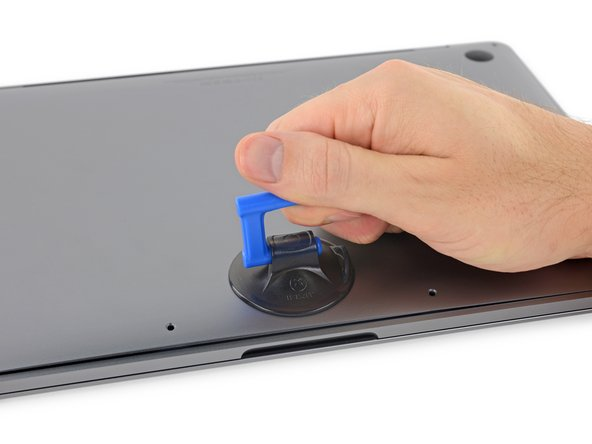
- Gently place a suction cup and pull slowly to raise the screen. Be gentle and slow.
- After removing, clean the area with a microfiber cloth, smudging away fingerprints and smudges.
- Line up your replacement screen and follow directions from your kit for reassembly.
Tip: Always use a flat, static-free surface. Mismanaging a single screw can harm internal parts.
DIY Screen Replacement Kits: Worth It?
You can get DIY kits online ranging from $300 to $700. They usually come with:
- A new screen
- Tools needed (screwdrivers, suction tools, etc.)
- Reassembly safety screws
- Make sure your Mac can recognize the new display with calibration tools
But beware—these kits have pitfalls. Without proper knowledge or a steady hand, you may end up creating more problems than you solve. When things do go wrong, repairs can cost more than visiting the Apple Store.
Considering Battery Replacement Too?
If your MacBook’s battery has been sluggish, some kits also include a battery replacement option for around $100–$110. It’s a good time to upgrade both, especially if you’re already opening up your device. Just make sure your chosen kit includes all the right tools for safe removal and installation.
AppleCare+: A Safety Net That Pays Off
If you’ve already paid for AppleCare+, you’re set. The plan pays for most hardware-related problems, such as screen replacements, accidental damage, and out-of-warranty repair.
- Average cost of screen replacement under AppleCare+: about $300
- Without AppleCare+: anticipate paying $530 to $650
AppleCare+ also provides three years of service coverage, phone support, and on-site or mail-in repair as an option. And, they even cover shipping both directions if you go with mail service.
Apple Store Repairs: Expensive but Reliable
Apple’s official repair service might seem costly, but it comes with peace of mind. You’re getting original parts, certified technicians, and proper system calibration to ensure everything works smoothly.
- Third-party kits: $300–$700 (with risk)
- Apple Store screen repair: $530–$650 (without AppleCare+)
- With AppleCare+: ~$300
But screen damage isn’t always the only issue. If your MacBook has internal damage or starts showing strange behavior (like flickering lines or ghosting), it might be a sign of deeper issues—think graphics card or logic board problems. So it’s worth running a system check or macOS update too.
Repairs at The FIX: We’ve Got Your Back
If you’re close to a The FIX location, we’re here for you. Our experts possess the specialized equipment and experience necessary to perform delicate MacBook Pro screen replacements.
Your device is important to you. That’s why we:
- Carefully inspect to eliminate software causes (such as flickering due to Firefox or PRAM settings gone bad)
- Provide honest, upfront pricing
- Employ reputable parts and accurate calibration methods
Sometimes, a reboot or Safe Mode start is all it takes to clear things up—but if you’re seeing persistent cracks, dead pixels, or screen smudges that just won’t go away, don’t wait.
Final Thoughts: Fix with Care, Choose Wisely
Replacing a MacBook Pro screen isn’t just a technical repair—it’s about restoring your connection to the work, creativity, and communication that your Mac helps power.
Also Read : Laptop Battery Not Charging? Here Are 6 Simple Fixes You Can Try Today