By using this site, you agree to the Privacy Policy and Terms of Use.
Accept

Gadget Issues

Fix Your Gadgets

  • About Us
  • How to Fix
  • Error Fix
  • Tutorial
  • Tech News
© 2025 All Rights Reserved.
Reading: iOS 26 Beta 3 Rolls Out for iPhone With New Wallpapers and a Refined Liquid Glass Look
Share
Sign In
Notification Show More
Font ResizerAa

Gadget Issues

Fix Your Gadgets

Font ResizerAa
  • About Us
  • How to Fix
  • Error Fix
  • Tutorial
  • Tech News
Search
  • About Us
  • How to Fix
  • Error Fix
  • Tutorial
  • Tech News
Have an existing account? Sign In
Follow US
© 2022 Foxiz News Network. Ruby Design Company. All Rights Reserved.
Gadget Issues > Blog > Tech News > iOS 26 Beta 3 Rolls Out for iPhone With New Wallpapers and a Refined Liquid Glass Look
Tech News

iOS 26 Beta 3 Rolls Out for iPhone With New Wallpapers and a Refined Liquid Glass Look

skynet
Last updated: July 29, 2025 12:16 pm
skynet
Share
2 Min Read
iOS 26
SHARE

Apple has released iOS 26 Beta 3 for iPhone users, introducing several visual updates and design refinements. The new beta comes about a month after iOS 26 was first showcased during WWDC 2025.

Contents
What’s New in iOS 26 Beta 3Who Can Download iOS 26 Beta 3

Among the most noticeable changes is a darker version of Apple’s Liquid Glass interface, which was introduced in earlier betas. The updated design is aimed at improving readability, especially when using lighter wallpapers.

What’s New in iOS 26 Beta 3

One of the biggest updates is the tweak to the Liquid Glass UI. This translucent, glass-like effect reflects and refracts content behind it, creating a layered look across apps. Since its debut, feedback has been mixed—many users said text was hard to read, while others felt it looked distracting.
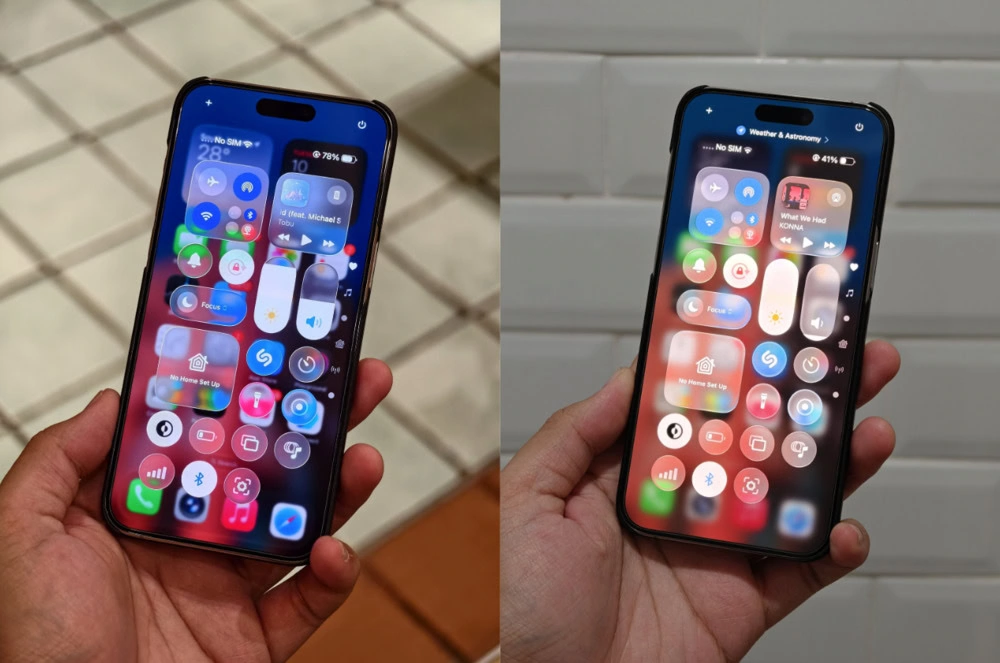
In Beta 3, Apple has darkened the Liquid Glass appearance in key apps like Apple Music and Podcasts. This change is expected to make text and icons easier to see, particularly in media controls.

The update also adds four new colour options for the default wallpapers, named Shadow, Sky, Halo, and Dusk. These new shades stand out even more when Dark Mode is enabled.

Other small but welcome changes include a new layout for the dock icons—apps will remain centered even if you only have one or two placed there, rather than aligning to the left as they did before. Apple has also refreshed the icons for the Files and Photos apps, giving them a slightly updated look.

Who Can Download iOS 26 Beta 3

iOS 26 Beta 3 is available as a free over-the-air update for registered Apple developers and public beta testers. You’ll need an iPhone 11 or newer to install it.

Keep in mind that Apple Intelligence features, which were announced alongside iOS 26, remain exclusive to the iPhone 16 series for now.

Also Read : Facebook Profile Lock: How to Lock Your Profile on Mobile and Desktop

You Might Also Like

Boat Launches Wave Fortune Smartwatch in India With NFC Tap-to-Pay and Bluetooth Calling

Pixel 10 Pro, Pixel 10 Pro XL Full Specs Leaked: Bigger Batteries, Faster Charging, and More RAM

Vivo T4R 5G Tipped to Launch in India Soon, Could Feature Dimensity 7400 Chipset

YouTube Shorts to Add Google’s Veo 3 AI Video Generator With Native Audio Support This Summer

Apple’s iOS 26 Update to Launch Without Some Features in the EU

TAGGED:Apple beta updateApple softwareBeta testingBeta wallpapersiOS 26 Beta 3iOS 26 wallpapersiOS design refreshiOS featuresiOS look and feeliOS UI polishiOS visual updateiPhone betaiPhone customizationLiquid Glass UI
Share This Article
Facebook Twitter Copy Link Print
Share
Previous Article OnePlus Nord 5 OnePlus Nord 5 and Nord CE 5 Launching Today: Prices, Specs, and Everything You Need to Know
Next Article Microsoft Edge Loads Websites Faster Thanks to WebUI 2.0 Upgrade

Latest News

How to Fix “USB Device Not Recognized”: A Complete Troubleshooting Guide
How to Fix
Stable Sight: 5 Ways to Stop Your Laptop Screen from Flickering.
How to Stop Laptop Screen Flickering: A Step-by-Step Fix Guide
How to Fix
Android speaker
8 Ways to Troubleshoot Any Speaker Issues on Your Android Phone
How to Fix
Phone Storage Full Fix
Free Up Storage Space on Your Phone in 6 Easy Steps
How to Fix
//

“Struggling with slow internet or other gadget problems? Our blog offers step-by-step solutions to common tech issues, helping you troubleshoot and resolve problems quickly and efficiently.”

Quick Link

  • Contact Us
  • Privacy Policy
  • Terms and Conditions
  • Cookie Policy
  • Disclaimer

Read Categories

  • Error Fix
  • How to Fix
  • Tech News
  • Tutorial
  • Uncategorized

Find Us on Socials

Follow US
© 2025 Gasgetissues. All Rights Reserved.
Welcome Back!

Sign in to your account


Lost your password?




