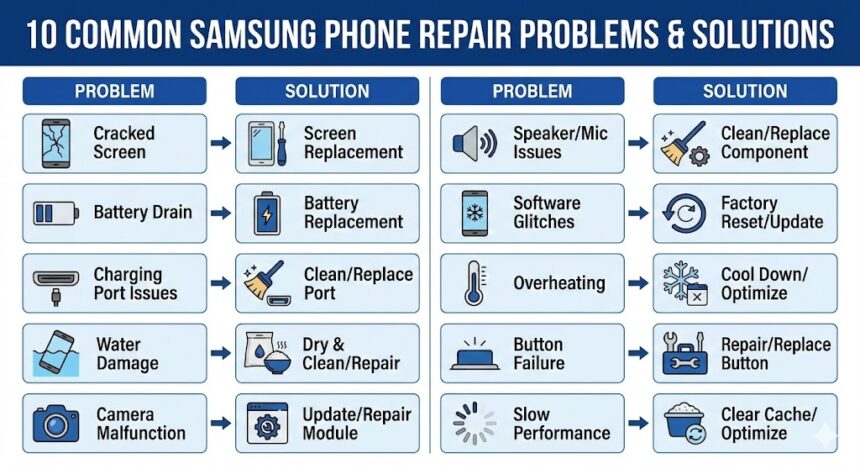
smartphones are incredibly popular worldwide. They are known for their innovative features, powerful performance, and sleek designs. However, despite their premium quality, they are not immune to issues over time.
Whether it is a cracked screen or a software glitch, every user faces problems eventually. While some minor issues can be fixed at home, others require professional intervention. Below, we discuss the 10 most common phone problems and how to solve them.
1. Cracked or Broken Screen
A shattered display is the most frequent repair issue. Accidental drops or pressure damage can severely compromise your screen. Consequently, you might experience touch unresponsiveness or black spots.
- Solution: Apply a screen protector for minor cracks to prevent further damage. However, severe damage requires a complete to restore functionality.
2. Battery Draining Too Fast
Does your phone lose battery quickly? This is a common problem caused by battery aging, background apps, or excessive screen brightness.
- Solution: Close unused background apps and reduce your screen brightness. Furthermore, enable Android’s built-in . If the rapid drain continues, you likely need a fresh battery replacement.
3. Unresponsive Touchscreen
An unresponsive screen makes your device nearly impossible to use. This may occur due to software glitches or internal physical damage.
- Solution: First, restart your phone. Next, clean the screen with a microfiber cloth to remove grease. If none of these steps work, the internal digitizer is likely damaged and requires professional repair.
4. Water Damage
Accidentally dropped your phone in water? While many modern devices have , they are not entirely waterproof indefinitely.
- Solution: Immediately turn off the device to prevent short circuits. Remove the SIM card and dry the phone with a soft cloth. Do not use a hairdryer, as heat can worsen the damage. Instead, bring it to an expert for advanced drying.
5. Overheating Issues
Phones often overheat due to prolonged gaming or excessive charging. Overheating can slow down performance and even cause battery swelling.
- Solution: Avoid using your phone while it is plugged in. Close heavy apps immediately. If the device remains consistently hot, it indicates a deeper motherboard or battery issue that needs a professional diagnosis.
6. Charging Port Not Working
Is your phone charging slowly or not at all? A clogged or damaged charging port is often the culprit.
- Solution: Carefully use a soft brush or to clean the port. Additionally, try using a different cable. If the port is physically broken, it must be replaced.
7. Speaker or Microphone Issues
Are you experiencing muffled sound during calls? This is usually caused by dirt buildup or hardware failure.
- Solution: Restart your device and check your volume settings. Next, gently clean the speaker grills and microphone openings. If the problem persists, you need a professional hardware repair to restore clear sound.
8. Camera Not Working or Blurry Photos
Your camera should capture crystal-clear images. However, a damaged lens or software bug can cause blurriness or total camera failure.
- Solution: Clean the outer lens thoroughly with a microfiber cloth. Then, check your camera app settings. If the issue continues, a camera module replacement is the best solution.
9. Software Crashes or Freezing
A freezing phone is incredibly frustrating. Software bugs, malware, or a completely full storage drive often cause these lags.
- Solution: Free up storage space by deleting unnecessary files. Furthermore, ensure your is fully updated. Seek expert troubleshooting if crashes persist.
10. SIM Card Not Detected
Your phone might display a “No SIM Card” error, completely preventing network access. This is due to a damaged SIM slot or a software glitch.
- Solution: Restart your phone and carefully clean the SIM tray. Try inserting the SIM into another device to test it. If the issue remains isolated to your Samsung device, the internal slot requires repair.
Get Professional Samsung Phone Experts in Adelaide
For fast, reliable, and expert Samsung phone repair, trust SAM Phone Repair to deliver the best results. We use high-quality parts, advanced tools, and years of expertise to ensure every repair is completed with precision. Don’t let phone issues slow you down!
Also Read : How to Fix a Disabled iPod Touch: Step-by-Step Guide