
In today’s hyper-connected world, our mobile phones are more than just tools for calling or texting—they’re our cameras, calendars, wallets, and daily lifelines. But like all electronics, they’re not immune to problems. Whether it’s a cracked screen, a dying battery, or an unresponsive app, mobile phone issues can be frustrating.
The good news? Not every issue needs a trip to the service center. With a little guidance and the right tools, you can fix many common phone problems on your own. Below, we share expert tips and practical steps to safely and effectively handle the most common mobile phone issues.
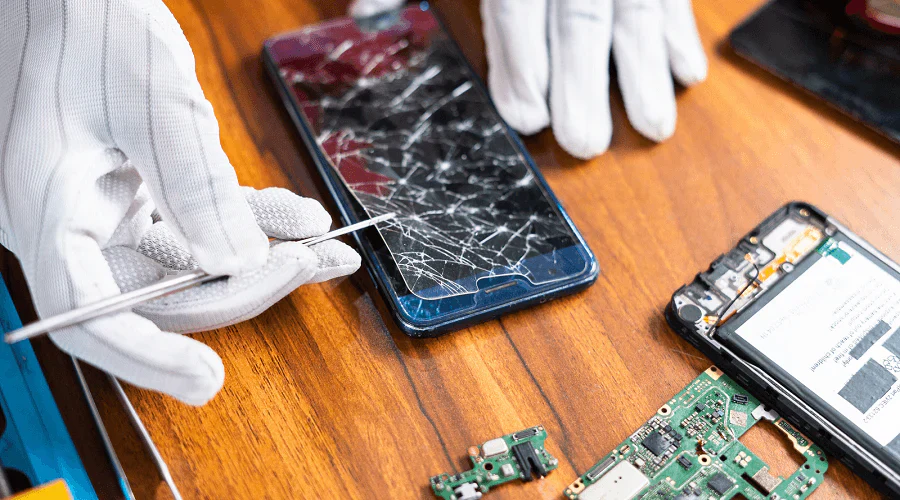
1. Safety Comes First
Before you open up your device, keep these precautions in mind:
- Turn Off the Phone: Always power down and, if possible, disconnect the battery before starting.
- Use an Anti-Static Wrist Strap: Prevent electrostatic discharge, which can harm internal components.
- Work in a Bright, Ventilated Space: Good lighting helps spot tiny parts. Ventilation is essential, especially when using adhesives.
- Handle Batteries with Care: Never try to repair or reuse a swollen or leaking battery. Dispose of it properly to avoid fire risks.
2. Test and Document Everything
Proper testing helps you pinpoint the issue and track progress.
- Test Before Disassembly: Make note of what works and what doesn’t (screen, camera, sound, etc.).
- Take Step-by-Step Photos: Visual references are your best friend during reassembly.
- Test Again After Repair: Double-check everything—touchscreen, speaker, charging port, etc.—once you’re done.
3. Avoid These Common DIY Mistakes
- Using Improper Tools: Invest in a proper phone repair kit. Regular screwdrivers can damage sensitive parts.
- Neglecting Safety: Accidentally puncturing a battery can cause fire or explosion.
- Buying Cheap Parts: Opt for high-quality, OEM parts. Cheap replacements often cause more harm in the long run.
- Losing Screws or Components: Use magnetic mats or labeled containers to organize tiny screws and parts.
The 5 Most Common Mobile Phone Repairs (And How to Fix Them)
1. Cracked or Broken Screen
One of the most common issues—often caused by accidental drops.
- Tools Needed: Suction cups, plastic pry tools, precision screwdrivers, heat gun.
- Steps: Heat the edges to soften the adhesive, gently lift with a suction cup, and pry the screen off. Replace with a new screen and reassemble.
2. Battery Problems
If your phone doesn’t hold a charge or shuts down quickly, it may be time for a battery swap.
- Tools Needed: Screwdrivers, pry tools.
- Steps: Open the back panel, disconnect and remove the old battery, and install the new one securely.
3. Charging Port Issues
Frequent plugging can loosen or damage the port.
- Tools Needed: Multimeter, soldering iron.
- Steps: Test the port for connectivity. If damaged, carefully re-solder or replace the port module.
4. Water or Drop Damage
Water spills or hard drops can damage internal parts like the motherboard.
- Tools Needed: Isopropyl alcohol, brushes, soldering tools.
- Steps: Power off immediately. Open the phone, remove the battery, and clean components with alcohol. Dry completely before testing. Replace damaged parts as needed.
5. Software Glitches
Apps crashing? Phone freezing? These could be software-related.
- Fixes:
- Restart the phone
- Update the OS and apps
- Clear app cache and unused data
- If needed, back up and perform a factory reset
Basic Troubleshooting Before You Open the Phone
Try these steps first for minor issues:
- Restart the Phone: Solves most temporary bugs or lags.
- Clear Cache/Data: Especially helpful for sluggish performance.
- Free Up Storage: Low space affects speed and functionality.
- Software Update: Ensures compatibility and stability.
- Factory Reset: A last resort for persistent software issues.
Essential Tools for DIY Phone Repair
Keep these tools in your kit if you’re serious about DIY phone repairs:
- Precision Screwdrivers: To safely open your phone.
- Plastic Pry Tools & Suction Cups: To remove screens and back panels without scratches.
- Soldering Iron & Multimeter: For electrical repairs like charging ports or motherboard issues.
- Anti-Static Mat & Wrist Strap: To prevent accidental damage from static electricity.
How to Prevent Future Phone Problems
A little prevention goes a long way in avoiding repairs:
- Use a Screen Protector & Case: These protect your phone from drops and scratches.
- Avoid Water Exposure: Even water-resistant phones aren’t waterproof.
- Charge Smartly: Avoid overcharging or using damaged chargers.
- Keep Software Updated: Updates fix bugs and improve device performance.
Final Thoughts
Fixing a phone might seem intimidating, but with a little patience, the right tools, and safe practices, many common issues are surprisingly doable at home. That said, not every repair is DIY-friendly. If you’re dealing with motherboard failures, internal corrosion, or advanced software problems, don’t hesitate to call in the pros.
Also Read : Clutch Secures $20M to Expand Its Non-Human Security Identity Platform