By using this site, you agree to the Privacy Policy and Terms of Use.
Accept

Gadget Issues

Fix Your Gadgets

  • About Us
  • How to Fix
  • Error Fix
  • Tutorial
  • Tech News
© 2025 All Rights Reserved.
Reading: How to Repair a Charger Cord: A Step-by-Step Guide
Share
Sign In
Notification Show More
Font ResizerAa

Gadget Issues

Fix Your Gadgets

Font ResizerAa
  • About Us
  • How to Fix
  • Error Fix
  • Tutorial
  • Tech News
Search
  • About Us
  • How to Fix
  • Error Fix
  • Tutorial
  • Tech News
Have an existing account? Sign In
Follow US
© 2022 Foxiz News Network. Ruby Design Company. All Rights Reserved.
Gadget Issues > Blog > How to Fix > How to Repair a Charger Cord: A Step-by-Step Guide
How to Fix

How to Repair a Charger Cord: A Step-by-Step Guide

skynet
Last updated: April 10, 2025 4:37 am
skynet
Share
3 Min Read
SHARE

A damaged charger cord can be inconvenient and potentially dangerous if not handled correctly. Frayed wires, loose connections, or bent tips are common issues that can affect the charging efficiency of your devices. While replacing the cord is ideal, a careful DIY repair can offer a temporary or long-term solution if done properly.

Contents
Safety FirstMaterials You’ll NeedStep 1: Inspect the DamageStep 2: Trim and Strip the WireStep 3: Reconnect the WiresStep 4: Insulate and SealStep 5: Test the ChargerConclusion

Safety First

Before attempting any repair, unplug the charger from the power source and device. Ensure there is no current running through the wire to avoid shock or further damage.

Materials You’ll Need

  • Electrical tape or heat shrink tubing
  • Wire cutter/stripper
  • Soldering kit (optional, for a stronger fix)
  • Multimeter (to test continuity)

Step 1: Inspect the Damage

Identify the damaged section of the cord. If the insulation is cracked or wires are exposed near the connector or mid-cable, mark the spot. If the internal wires are broken, you may need to cut and reconnect them.

Step 2: Trim and Strip the Wire
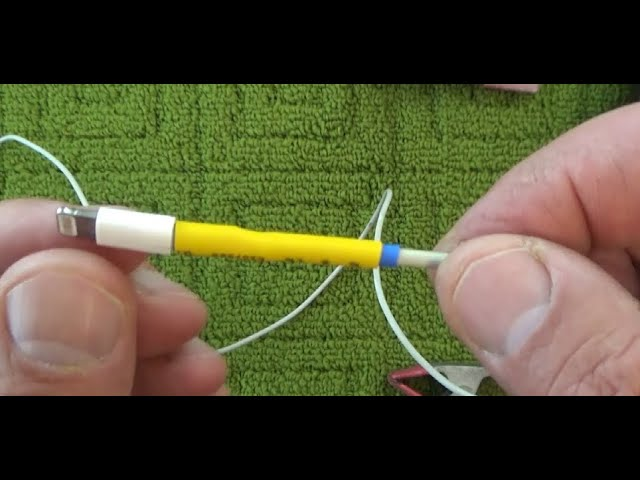
Cut out the damaged section of the cable using a wire cutter. Strip about one inch of the outer insulation from both ends of the remaining cord. Then, strip a small amount of insulation off each internal wire.

Step 3: Reconnect the Wires

Twist matching colored wires from both ends together. For a more secure and long-lasting repair, solder the connections. If soldering isn’t available, make sure the wires are tightly twisted and secure.

Step 4: Insulate and Seal

Wrap each wire separately with electrical tape to prevent short circuits. Then wrap the entire cable section with electrical tape or slide heat shrink tubing over the area and use a heat gun to seal it tightly.

Step 5: Test the Charger

Use a multimeter to ensure proper continuity through the cable. Plug it into your device to confirm that it is charging correctly and safely.

Conclusion

Repairing a charger cord requires attention to detail and safety precautions. While it’s a cost-effective alternative to replacement, always consider whether it’s safer and more practical to invest in a new certified charger. For critical or expensive devices, using a factory-recommended cable is the most reliable option.

Also Read : Complete Guide to Repairing Your iPhone 15: Fix Common Issues Yourself
You Might Also Like

How to Effectively Remove Water From Your Samsung Phone: A Step-by-Step Guide

How to Fix MacBook Display “Staingate” Issue: A Step-by-Step Guide

How to Fix a Water-Damaged Charging Port

How to Boot Your Samsung Galaxy in Safe Mode – A Step-by-Step Guide

Can’t Boot from USB Flash Drive – Troubleshooting Guide

TAGGED:**How to Repair a Charger Cord: A Step-by-Step Guide**Cost-Effective SolutionsDIY Cord Repair TipsFixing Damaged Charger CablesIdentifying Frayed Wires or BreaksPreventing Future DamageSafely Splicing and InsulatingTools and Materials NeededWhen to Replace Instead of Repair
Share This Article
Facebook Twitter Copy Link Print
Share
Previous Article How to Repair the Charger Port on Your Samsung Galaxy Phone
Next Article What You Should Know Before You Fix Your PlayStation

Latest News

How to Fix “USB Device Not Recognized”: A Complete Troubleshooting Guide
How to Fix
Stable Sight: 5 Ways to Stop Your Laptop Screen from Flickering.
How to Stop Laptop Screen Flickering: A Step-by-Step Fix Guide
How to Fix
Android speaker
8 Ways to Troubleshoot Any Speaker Issues on Your Android Phone
How to Fix
Phone Storage Full Fix
Free Up Storage Space on Your Phone in 6 Easy Steps
How to Fix
//

“Struggling with slow internet or other gadget problems? Our blog offers step-by-step solutions to common tech issues, helping you troubleshoot and resolve problems quickly and efficiently.”

Quick Link

  • Contact Us
  • Privacy Policy
  • Terms and Conditions
  • Cookie Policy
  • Disclaimer

Read Categories

  • Error Fix
  • How to Fix
  • Tech News
  • Tutorial
  • Uncategorized

Find Us on Socials

Follow US
© 2025 Gasgetissues. All Rights Reserved.
Welcome Back!

Sign in to your account


Lost your password?