By using this site, you agree to the Privacy Policy and Terms of Use.
Accept

Gadget Issues

Fix Your Gadgets

  • About Us
  • How to Fix
  • Error Fix
  • Tutorial
  • Tech News
© 2025 All Rights Reserved.
Reading: MacBook Pro 15″ (Early 2011) Teardown & Analysis
Share
Sign In
Notification Show More
Font ResizerAa

Gadget Issues

Fix Your Gadgets

Font ResizerAa
  • About Us
  • How to Fix
  • Error Fix
  • Tutorial
  • Tech News
Search
  • About Us
  • How to Fix
  • Error Fix
  • Tutorial
  • Tech News
Have an existing account? Sign In
Follow US
© 2022 Foxiz News Network. Ruby Design Company. All Rights Reserved.
Gadget Issues > Blog > Error Fix > MacBook Pro 15″ (Early 2011) Teardown & Analysis
Error Fix

MacBook Pro 15″ (Early 2011) Teardown & Analysis

skynet
Last updated: February 20, 2025 4:33 am
skynet
Share
2 Min Read
SHARE

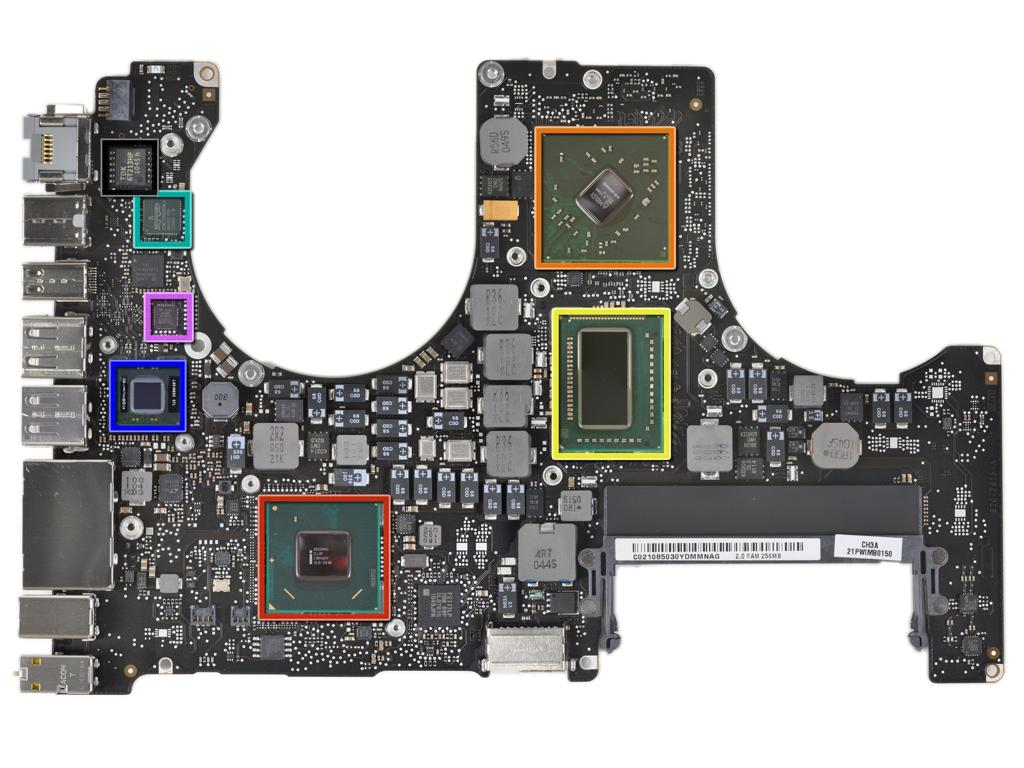
Apple’s MacBook Pro 15″ (Early 2011) introduced significant hardware improvements, including the first quad-core processor in a MacBook and the Thunderbolt port. This teardown provides a detailed analysis of its internal components, performance enhancements, and overall repairability.

Contents
Design & BuildPerformance UpgradesBattery & RepairabilityThermal ManagementConnectivity & WirelessRepairability Score: 7/10Conclusion

Design & Build

  • The model number (A1286) remains unchanged since 2008.
  • The unibody aluminum design ensures durability while allowing access to internal components.

Performance Upgrades

  • Powered by Intel’s Core i7 quad-core processor, delivering a notable performance boost.
  • Features the AMD Radeon HD 6490M GPU, enhancing graphics capabilities.
  • The introduction of Thunderbolt enables high-speed data transfers up to 10 Gbps.

Battery & Repairability

  • Equipped with a 77.5Wh battery, with Apple claiming a 7-hour backup under optimal conditions.
  • The battery is secured with Tri-Wing screws, making user replacement difficult without specialized tools.

Thermal Management
  • A large primary heat sink, supplemented by two smaller ones, is used for cooling.
  • The application of thermal paste is excessive, which may contribute to long-term overheating issues.

Connectivity & Wireless

  • The Broadcom BCM4331 chip improves Wi-Fi performance.
  • Bluetooth 3.0 with a dedicated antenna enhances wireless connectivity.

Repairability Score: 7/10

  • Pros:
    • Easy access to internal components.
    • Modular design for storage and RAM upgrades.
  • Cons:
    • Battery replacement requires specialized tools.
    • Display and LCD repairs are complex due to the integrated assembly.

Conclusion

The MacBook Pro 15″ (Early 2011) offers strong performance upgrades and a robust design. However, Apple’s restrictive design choices, such as the use of proprietary screws and non-user-replaceable batteries, impact repairability. While the machine is reliable in the short term, potential thermal issues and limited upgradability may affect long-term usability.

Also Read : How to Fix LCD Screen Lines on Your Phone: A Step-by-Step Guide

You Might Also Like

iPhone 16 Pro Max Battery Replacement: A Step-by-Step Guide

Apple’s iOS 26 Update to Launch Without Some Features in the EU

Why Is My Phone Overheating? Causes and Fixes

Foldable iPhone Enters Prototype Production, May Launch in Second Half of 2026: Report

Lenovo ThinkPad P1 Gen 7 LPCAMM2 Memory Replacement Guide

TAGGED:AppleHardware AnalysisLaptop TeardownMacBook Pro 2011Tech Repair
Share This Article
Facebook Twitter Copy Link Print
Share
Previous Article Google Pixel 3 XL Teardown Analysis
Next Article How to Fix Sticky MacBook Keyboard Keys: A Complete Step-by-Step Guide

Latest News

How to Fix “USB Device Not Recognized”: A Complete Troubleshooting Guide
How to Fix
Stable Sight: 5 Ways to Stop Your Laptop Screen from Flickering.
How to Stop Laptop Screen Flickering: A Step-by-Step Fix Guide
How to Fix
Android speaker
8 Ways to Troubleshoot Any Speaker Issues on Your Android Phone
How to Fix
Phone Storage Full Fix
Free Up Storage Space on Your Phone in 6 Easy Steps
How to Fix
//

“Struggling with slow internet or other gadget problems? Our blog offers step-by-step solutions to common tech issues, helping you troubleshoot and resolve problems quickly and efficiently.”

Quick Link

  • Contact Us
  • Privacy Policy
  • Terms and Conditions
  • Cookie Policy
  • Disclaimer

Read Categories

  • Error Fix
  • How to Fix
  • Tech News
  • Tutorial
  • Uncategorized

Find Us on Socials

Follow US
© 2025 Gasgetissues. All Rights Reserved.
Welcome Back!

Sign in to your account


Lost your password?