By using this site, you agree to the Privacy Policy and Terms of Use.
Accept

Gadget Issues

Fix Your Gadgets

  • About Us
  • How to Fix
  • Error Fix
  • Tutorial
  • Tech News
© 2025 All Rights Reserved.
Reading: Cracked Screen on Your 65-Inch Philips TV? Here’s What You Can Do
Share
Sign In
Notification Show More
Font ResizerAa

Gadget Issues

Fix Your Gadgets

Font ResizerAa
  • About Us
  • How to Fix
  • Error Fix
  • Tutorial
  • Tech News
Search
  • About Us
  • How to Fix
  • Error Fix
  • Tutorial
  • Tech News
Have an existing account? Sign In
Follow US
© 2022 Foxiz News Network. Ruby Design Company. All Rights Reserved.
Gadget Issues > Blog > How to Fix > Cracked Screen on Your 65-Inch Philips TV? Here’s What You Can Do
How to Fix

Cracked Screen on Your 65-Inch Philips TV? Here’s What You Can Do

skynet
Last updated: May 26, 2025 9:11 am
skynet
Share
3 Min Read
SHARE

It’s a sinking feeling — you just caught a glimpse of a crack on your Philips TV screen. Perhaps it was a knock, a flying remote, or a mysterious accident, but a cracked screen is a hassle and a costly repair to mend. So, can it be repaired? Let’s examine.

Contents
Can A Cracked TV Screen Be Fixed?First Things You Should Do:1. Verify the Warranty2. Evaluate the Damage3. Obtain a Repair QuoteRepair or Replace: What is Reasonable?Other Options to ConsiderFinal Thoughts

Can A Cracked TV Screen Be Fixed?

In general, no. TVs are not repairable, unlike smartphones. If the screen is broken, it usually has to be replaced outright. And, sorry, a replacement panel for a 65-inch Philips TV can cost as much — or more — than a new TV.

First Things You Should Do:

1. Verify the Warranty

Regular Philips warranties won’t protect against physical damage, but if you bought extended coverage or accidental damage protection at a retail store, it’s time to examine the documents.

2. Evaluate the Damage
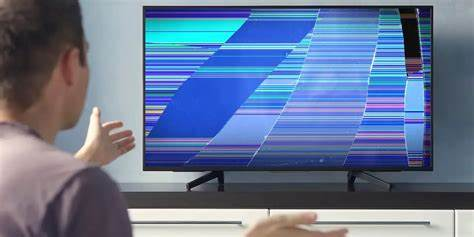
Is it displaying black spots, lines, or not even turning on? That generally indicates that you’ll need a full screen replacement. If it’s just a small crack and the image is working, you might be fine for a bit — but it won’t improve over time.

3. Obtain a Repair Quote

Call Philips customer service or a local TV repair shop and inquire about how much it will be to replace. Here is the honest truth: replacement screens for big TVs are expensive and are worth searching for.

Repair or Replace: What is Reasonable?

OptionEstimated Cost
Screen replacement (65″ Philips TV)₹25,000 – ₹50,000+
New 65″ Philips TV₹45,000 – ₹60,000+

Unless your TV is a premium version (such as Ambilight or OLED), it usually is more handy to purchase a new TV than to repair a broken one.

Other Options to Consider

  • Sell it for spares – Individuals purchase damaged TVs for spares. You can sell it on OLX, Quikr, or Facebook Marketplace.
  • Recycle it properly – Do not throw it away. Broken TVs can be dropped off at most electronic stores or Philips service centers for disposal.
  • Use it for audio streaming – You can still use it for music purposes or as background sound even if you no longer have the display.

Final Thoughts

A cracked screen usually is the death knell for the majority of TVs, particularly big screens such as a 65-inch Philips. Although it’s frustrating, buying a new one is typically the smartest financial decision. Yet, always look at your warranty or protection plan first before you throw in the towel — you could be more fortunate than you realize.

Also Read : HP Laptop Keyboard Not Responding After Water Spill? Here’s How To Fix It

You Might Also Like

How to Effectively Remove Water From Your Samsung Phone: A Step-by-Step Guide

How to Fix MacBook Display “Staingate” Issue: A Step-by-Step Guide

How to Fix a Water-Damaged Charging Port

How to Boot Your Samsung Galaxy in Safe Mode – A Step-by-Step Guide

Can’t Boot from USB Flash Drive – Troubleshooting Guide

TAGGED:65InchTVBrokenTVSolutionsConsumerElectronicsHelpCrackedScreenFixDIYTVFixHomeElectronicsPhilipsSupportPhilipsTVRepairScreenReplacementSmartTVIssuesTVMaintenanceTVRepairGuideTVScreenDamage
Share This Article
Facebook Twitter Copy Link Print
Share
Previous Article How to Repair Screen Flickering on Startup: Fast Solutions That Really Work
Next Article Fixing a Broken Computer Display: A Beginner’s Step-by-Step Guide

Latest News

How to Fix “USB Device Not Recognized”: A Complete Troubleshooting Guide
How to Fix
Stable Sight: 5 Ways to Stop Your Laptop Screen from Flickering.
How to Stop Laptop Screen Flickering: A Step-by-Step Fix Guide
How to Fix
Android speaker
8 Ways to Troubleshoot Any Speaker Issues on Your Android Phone
How to Fix
Phone Storage Full Fix
Free Up Storage Space on Your Phone in 6 Easy Steps
How to Fix
//

“Struggling with slow internet or other gadget problems? Our blog offers step-by-step solutions to common tech issues, helping you troubleshoot and resolve problems quickly and efficiently.”

Quick Link

  • Contact Us
  • Privacy Policy
  • Terms and Conditions
  • Cookie Policy
  • Disclaimer

Read Categories

  • Error Fix
  • How to Fix
  • Tech News
  • Tutorial
  • Uncategorized

Find Us on Socials

Follow US
© 2025 Gasgetissues. All Rights Reserved.
Welcome Back!

Sign in to your account


Lost your password?